 SupaFocus
The App Blocker You Can't Turn Off
SupaFocus Strict mode is an app blocker that cannot be turned off: once a Strict session starts, blocked apps and websites stay blocked until the timer completes, with no early exit. Intermediate levels — Time-Locked waits and Math Challenge exits — add friction without going fully unbreakable.
If you can turn it off, you will
Every failed screen-time attempt has the same last chapter: you built the fence, then you climbed over it. Apple's “Ignore Limit” button, deleting the blocker app, toggling the block off “just this once” — when the cost of quitting is one tap, quitting is inevitable.
Behavioral economists call the fix a commitment device: a choice your present self makes that your future self can't undo. That's what SupaFocus commitment levels are.
Pick your level of serious
- Normal — end anytime with a confirmation. For low-stakes sessions.
- Time-Locked — ending requires a forced wait (1 minute free, up to 10 minutes with Pro). Kills impulse exits: by the time the wait is over, the urge usually is too.
- Math Challenge (Pro) — solve 3 math problems to exit early. Just enough friction to make you ask “do I actually need this?”
- Strict (Pro) — cannot be ended until the session completes. The real deal: no button, no override, no negotiation.
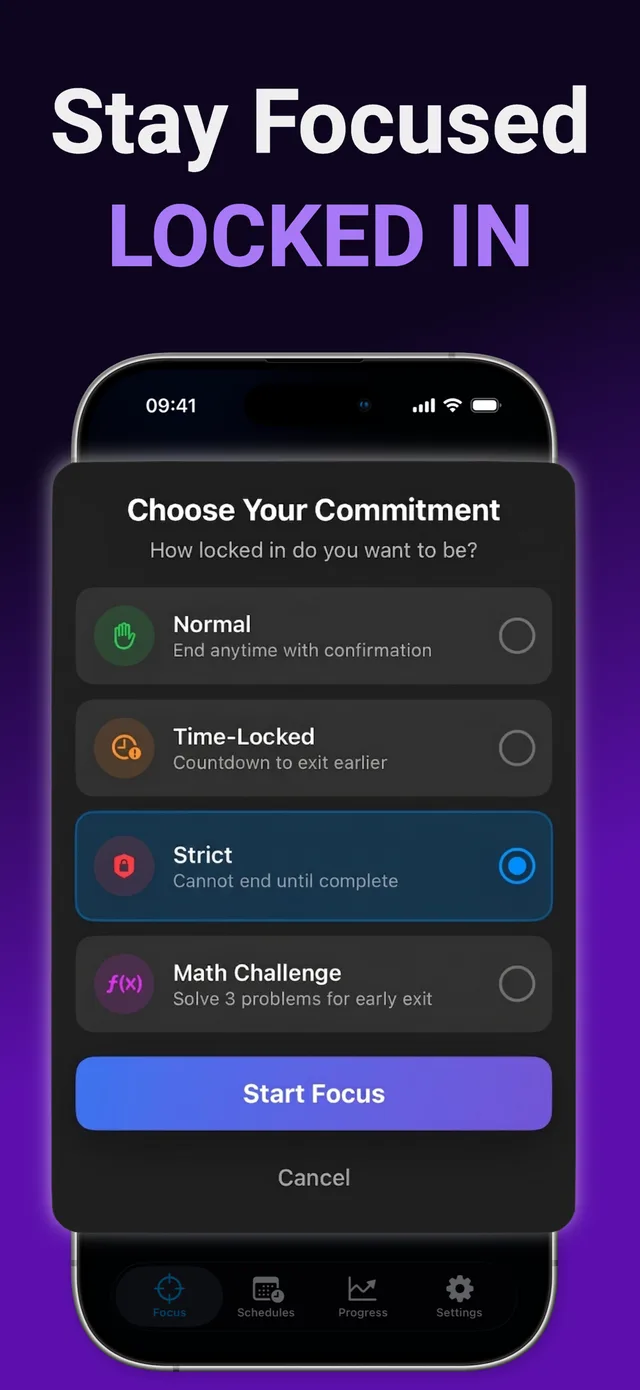
How to start an unbreakable focus session
Set up your block list
Choose the apps and websites that always pull you back in.
Choose your commitment level
Start with Time-Locked; graduate to Strict when you're ready to mean it.
Set the duration
From 25 minutes to 4 weeks. Be ambitious but realistic — Strict means strict.
Start the session
From this moment, the block outranks your impulses. See you on the other side.
Ready to try it?
SupaFocus is free on the App Store. Set up your first block in under a minute.
Download SupaFocus FreeFrequently asked questions
Can I really not end a Strict session early?
Correct — a Strict session runs to completion. That's the point: it's a commitment device, so choose your duration deliberately.
What if there's an emergency?
Strict mode only blocks the apps you selected. Phone calls, Messages, and every unblocked app work normally throughout.
Can't I just delete SupaFocus to escape the block?
Screen Time restrictions applied by a Strict session are designed to hold for the session you committed to — the whole value is that there's no easy way out.