 SupaFocus
How to Set App Time Limits on iPhone — That Actually Hold
To set an app time limit on iPhone that can't be ignored, create a Usage Limit in SupaFocus: choose the apps, set a daily budget such as 30 minutes, and when the time is spent the apps are automatically blocked until midnight — with no 'Ignore Limit' button.
The problem with Apple's built-in limits
Apple's Screen Time app limits are well-intentioned, but everyone knows the flaw: when time runs out, iOS offers “Ignore Limit” — one more minute, 15 more minutes, or ignore for the day. A limit you can dismiss with one tap isn't a limit; it's a suggestion.
Limits that actually block
SupaFocus usage limits use the same Screen Time API, but when your budget is spent, the app is blocked — you get a notification, the app shows a block screen, and it stays that way until midnight. Budget your time like money: when it's spent, it's spent.
- 30 min/day of social media — enough to check in, not enough to sink an evening
- 1 hour/day of games — fun stays fun
- 15 min/day of news — informed, not doomscrolling
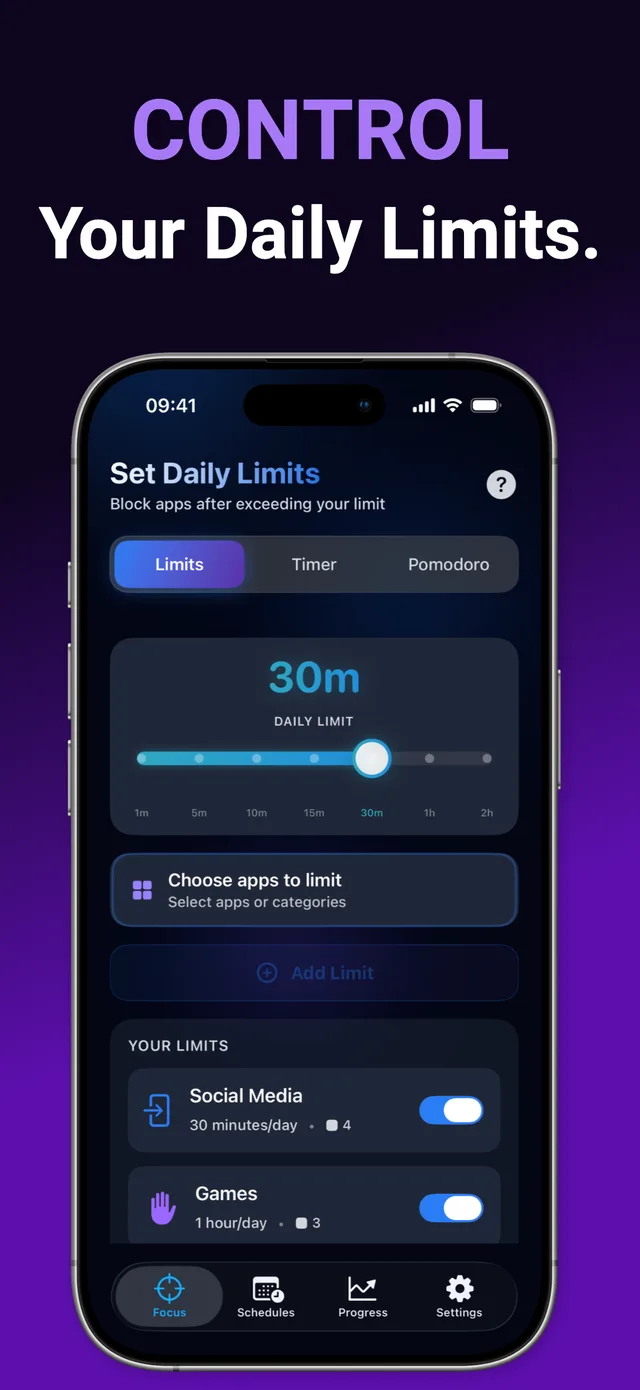
How to set a daily app limit with SupaFocus
Create a usage limit
In SupaFocus, open Limits and tap Add Limit.
Choose apps or categories
Select specific apps or a whole category like Social Media or Games.
Set the daily budget
Pick your time — from 1 minute to 2 hours per day.
Let it enforce itself
Exceed the budget and the apps block until midnight, automatically. Limits reset each day.
Ready to try it?
SupaFocus is free on the App Store. Set up your first block in under a minute.
Download SupaFocus FreeFrequently asked questions
What happens when I hit my daily limit?
You get a notification and the apps are blocked for the rest of the day. They unblock automatically at midnight.
Can I set different limits for different apps?
Yes — e.g. 30 minutes for social media and 1 hour for games. The free plan includes one limit; Pro unlocks unlimited limits.
Can I remove a limit if I really need the app?
You control your limits and can edit them — but during an active block, commitment levels like Strict mode keep you honest if you want them to.